Settings
MIDI

| Control | Meaning |
|---|---|
| CC Control Channel | Sets the channel on which MIDIfy accepts remote configuration CC messages, from 1 to 16. Set the channels for played notes separately in Presets → Ch. |
| Send CC 88 velocity prefix (14-bit) | Sends extra velocity precision before each note-on. Enable it when your receiving instrument supports the CC 88 high-resolution velocity prefix. |
BLE MIDI
These settings are available through the WLAN WebUI. Over USB, the panel is marked Not available over USB.
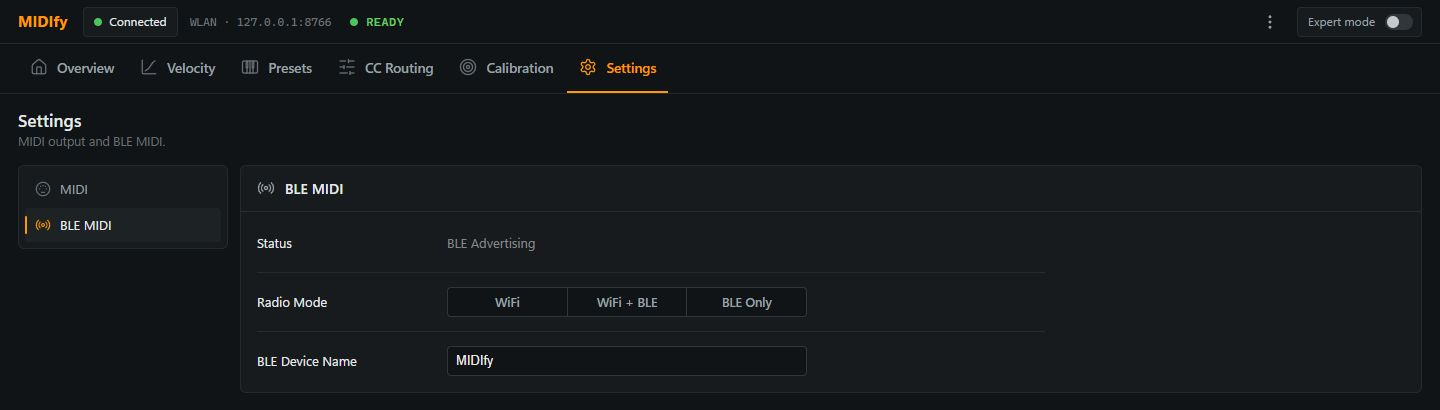
| Control or display | Meaning |
|---|---|
| Status | Shows the Bluetooth MIDI state. BLE Advertising means MIDIfy is available for a Bluetooth MIDI connection. |
| Radio Mode: WiFi | Keeps Wi-Fi available and disables Bluetooth MIDI. |
| Radio Mode: WiFi + BLE | Makes the Wi-Fi WebUI and Bluetooth MIDI available together. |
| Radio Mode: BLE Only | Switches off Wi-Fi and disconnects the WLAN WebUI. If no BLE connection is established within 30 seconds, MIDIfy falls back to Wi-Fi automatically. |
| BLE Device Name | Sets the name shown when selecting MIDIfy as a Bluetooth MIDI device. The name can contain up to 30 characters. |