Firmware
The Firmware tab is available over USB. All three update sections use the mainboard's USB connection; firmware updates are not available through the WLAN WebUI.
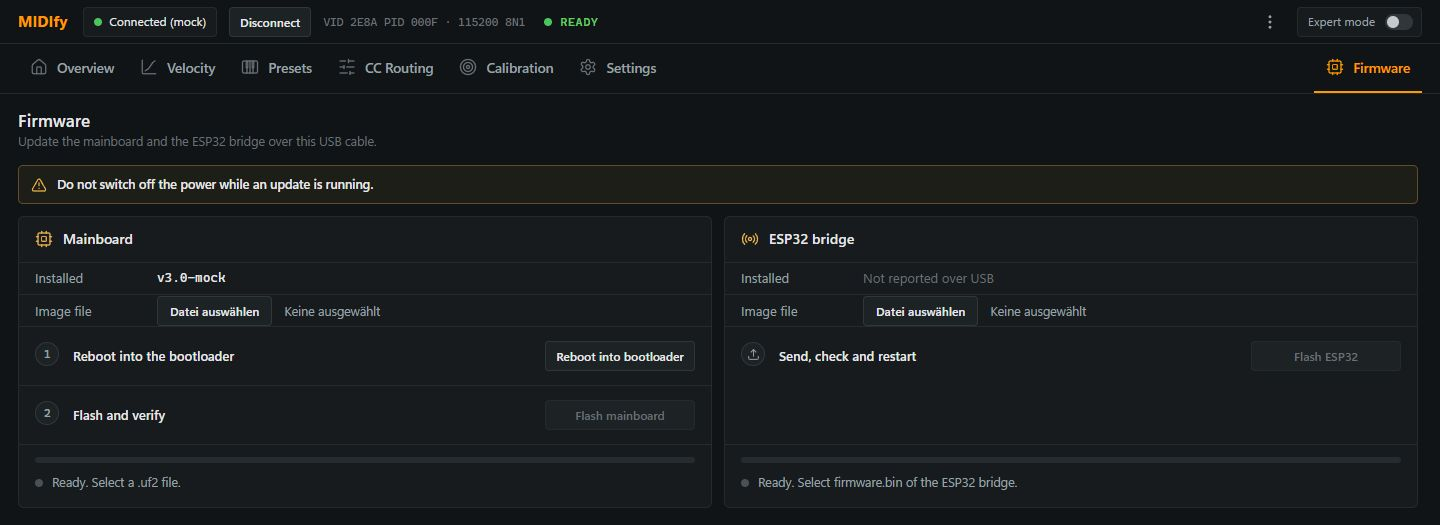
Keep the instrument powered and the USB connection in place until the update has finished. Use the firmware file intended for the component you are updating.
Mainboard
| Control or display | Meaning |
|---|---|
| Installed | Shows the mainboard's reported firmware version. |
| Image file | Selects the mainboard firmware file in .uf2 format. |
| Reboot into bootloader | Restarts the mainboard in its firmware-update mode. Follow any browser device-selection prompt. |
| Flash mainboard | Writes the selected firmware and verifies it. Follow the progress and result shown below the controls. |
| Progress / status | Shows the update stage, completion or an error that needs attention. |
ESP32 bridge
| Control or display | Meaning |
|---|---|
| Installed | May show Not reported over USB when the bridge version is not available through this connection. This does not by itself mean the bridge is missing. |
| Image file | Selects the ESP32 bridge's firmware image, firmware.bin. |
| Flash ESP32 | Transfers the image through the mainboard, checks it and restarts the bridge after a successful update. |
| Progress / status | Shows transfer and verification progress and the final result. |
Sensor boards
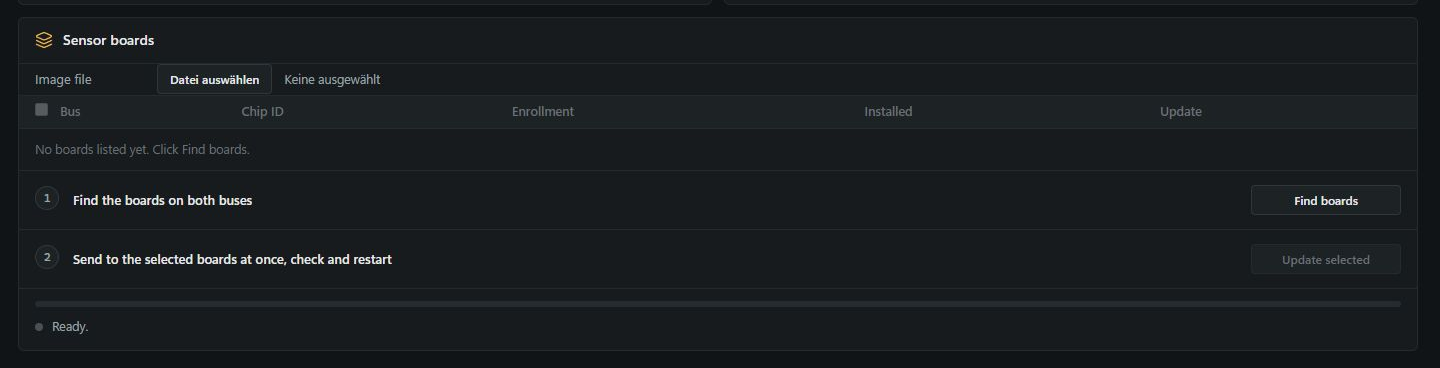
Use the Sensor boards block to update compatible sensorboards directly through the mainboard's USB connection, without disconnecting each board from the instrument.
| Control or display | Meaning |
|---|---|
| Image file | Selects the sensorboard firmware.bin file. |
| Find boards | Searches both sensor buses and lists the detected boards. |
| Selection checkboxes | Choose which compatible boards to update. |
| Bus / Chip ID / Enrollment | Identify each board's sensor bus, unique chip ID and enrollment status. |
| Installed | Shows the board's firmware version. |
| Update selected / Update N boards | Sends the image to the selected boards, checks it and restarts them. |
| Update | Shows the result for each board. |
| Progress / status | Shows transfer, verification and restart progress, completion or an error. |