Velocity — Expert Mode
First match the velocity curve and range to your playing. The additional controls below help address differences between keys or refine the detection of an attack.
Per-key sensitivity
Press Learn, play the key you want to adjust, then use + / − to change its sensitivity between 50 and 200%. This lets you compensate for a key that consistently plays softer or louder than its neighbours.
Manual overrides lists the individual adjustments. Reset all overrides returns every per-sensor sensitivity to 100% after confirmation.
Detection
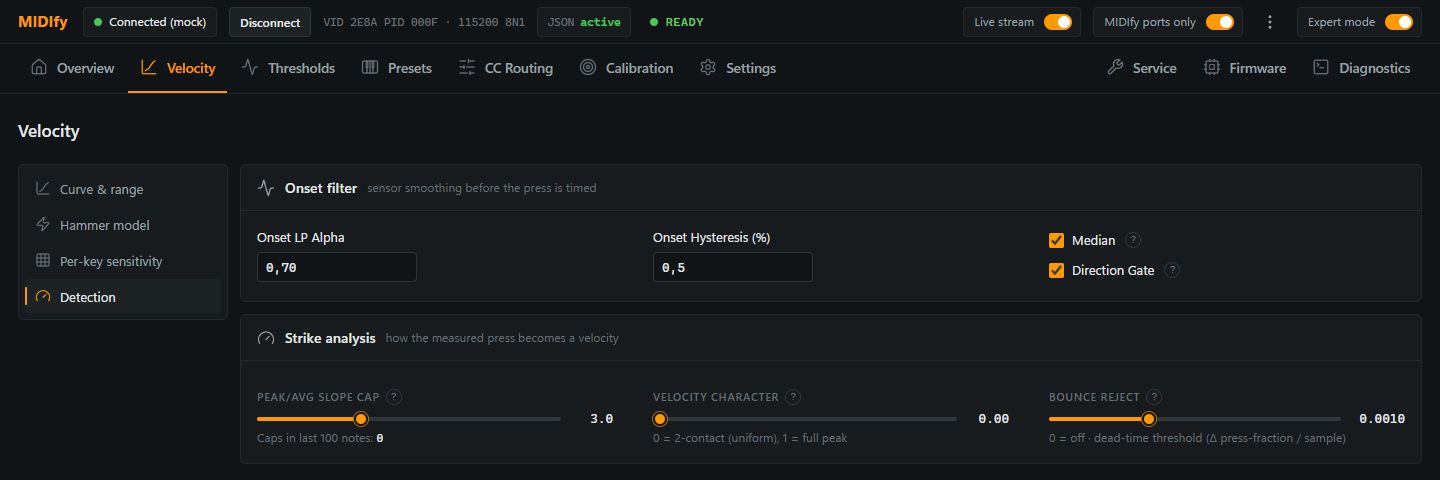
Onset filter
| Control | Effect |
|---|---|
| Onset LP Alpha | Smooths the sensor signal before the press is timed. Lower values smooth more but follow movement more slowly; higher values respond more directly. |
| Onset Hysteresis (%) | Adds a margin around the detection thresholds to reduce repeated crossings caused by small signal fluctuations. |
| Median | Filters isolated outliers using the last three samples. |
| Direction Gate | Ignores sample movement against the press direction to stabilise trigger detection. |
Strike analysis
| Control | Effect |
|---|---|
| Velocity Character | Blends from an average press-speed response at 0 towards a peak-speed response at 1. Higher values give short, sharp attacks more influence on velocity. |
| Peak/Avg Slope Cap | Limits how much a brief speed peak can exceed the average speed. It matters when Velocity Character uses the peak; the counter shows how often the limit was reached in the last 100 notes. |
| Bounce reject | Excludes movement below the progress threshold from the measured press time; 0 disables it. Too high a value can also exclude genuine slow movement and make a soft press louder. |
Velocity Character and Peak/Avg Slope Cap do not affect velocity when the Hammer model is active, because that model uses the virtual hammer's speed.
Hammer model: Advanced
These controls appear in Hammer model → Advanced when the Hammer model is enabled. The regular Hammer model controls describe the choice of trigger method and its playing response.
| Control | Effect |
|---|---|
| Hammer inertia | Controls how quickly hammer speed follows key movement. More inertia reduces the effect of very short jolts and can reduce the maximum velocity reached. |
| Contact tolerance | Changes when a stroke is reported as a hammer throw in the analysis. It does not change note timing or output velocity. |
| Velocity window | Sets the time window used to estimate key speed. Shorter windows react more quickly to changes; longer windows smooth them more. |