CC Routing
Use CC Routing to choose which physical controller inputs are active and which MIDI Control Change messages they send. Route the enabled inputs to the required zones in Presets.
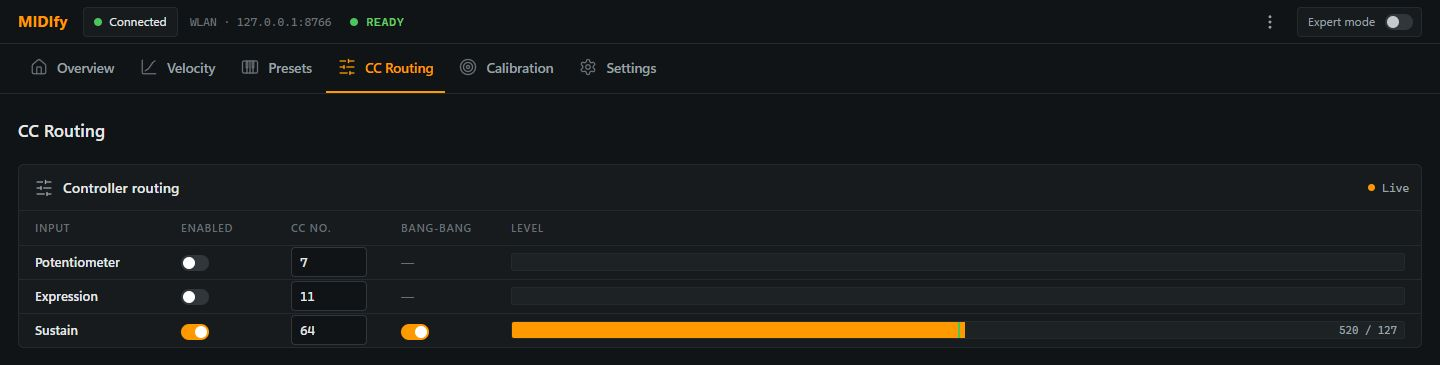
| Control or display | Meaning |
|---|---|
| Potentiometer | Configures the rotary controller input. Its MIDI function depends on the CC number and the receiving instrument. |
| Expression | Configures the expression-pedal input. |
| Sustain | Configures the sustain-sensor input. Calibrate its travel and switching point under Calibration → Sustain pedal. |
| Enabled | Enables or disables the input globally. A disabled input cannot be enabled just by selecting it in a preset zone. |
| CC No. | Sets the MIDI controller number for the input. For example, CC 7 is commonly used for volume, CC 11 for expression and CC 64 for sustain. |
| Bang-Bang | Makes sustain switch between MIDI values 0 and 127 at its trigger point. With it off, sustain sends a continuous controller value across the pedal travel. |
| Level | Shows the input level and the resulting MIDI value as you move the controller. For sustain, the marker indicates the switching point. |
| Live | Indicates that fresh controller readings are arriving. Waiting for data or a disconnected status means the display is not receiving current readings. |
Use Sustain pedal calibration to adjust where the sustain message switches.